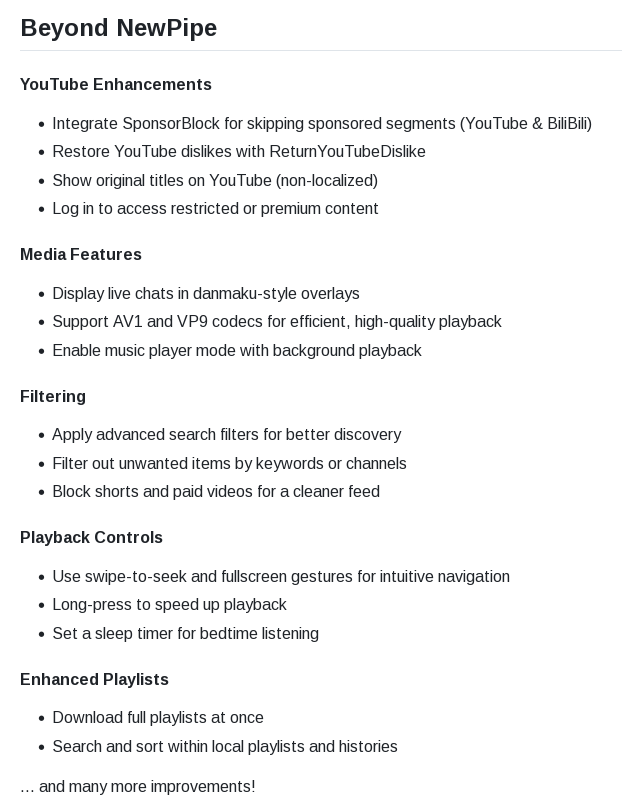
NewPipe’s extractor doesn’t work properly right now, as you can only watch videos in 360p. That’s the biggest upside of PipePipe but it also has some extra features like these:

dreamy

If you see that I’ve edited some of my posts/comments, it’s most likely a grammatical error or a spelling mistake I’ve fixed as I’m not a native speaker :)
- 3 Posts
- 11 Comments
Joined 2 months ago
Cake day: April 14th, 2026
You are not logged in. If you use a Fediverse account that is able to follow users, you can follow this user.
Sorry, I must’ve skipped over that.
They can still see what sites you visit even with Secure DNS though. That only blocks your ISP from seeing what domain names you’re connecting to, but they can still see the IP addresses. It’s useless, unless you’re using a VPN in which case it is worse for your privacy as it makes you more identifiable than just using your VPN’s DNS.
My recommendations:
Organic Maps -> CoMaps (they got forked because of some bad decisions.)
Brave -> Helium (has full uBlock Origin and Ungoogled Chromium patches, and no crypto bloat)
LibreTube -> PipePipe (has some nice features like live chat, and less buggy in my experience)
LibreOffice -> OnlyOffice (has better Microsoft Office compatibility, and easier to use in my experience)Disable your third-party DNS, that only works to make you more identifiable as you’re already using a VPN. You can also use Syncthing to sync your password vault etc. between your devices. I’d also recommend using Posteo instead of Tuta because it is cheaper and its privacy policy is kinda better.
 31·7 days ago
There are some pretty cheap listings, some even having escrow. I think I’ll go with this if I can’t find another solution. Thank you!
Mullvad VPN is always enabled with lockdown mode on my PC and my phone, I’m supposing that they’ve shadowbanned me because I’m using a VPN. I also don’t think Reddit is going to keep my IP private from the government so that’s why I do not plan on creating an account without a VPN.
I guess I could go to a cafe and try signing up via public Wi-Fi, but most of those in my city require a phone number to connect to, so I’m currently trying to find a way to do this without searching for a cafe that doesn’t have such a requirement :(
Thanks for the answer!
Do you have a link for where you saw those? I’m also not paying 30USD for a Reddit account :D, but I wouldn’t mind paying a smaller amount.
They’re still on Reddit and Discord 😭
Most of them don’t seem to care. I saw one comment that said even if only 1% of the population identified as queer, they couldn’t fit all those people in prison. I think they really underestimate the amount of people that will comply with these laws.
 2·1 month ago
If any Chrome users are reading this: You can just use Helium which includes uBlock Origin (not lite) and is based on Chromium.

You can install Aurora Store and use that instead of Play Store. Though be aware that disabling/removing Play Store may cause issues with some apps that require Google Play Services for some reason and those apps don’t have to be completely proprietary for this requirement (Stoat’s mobile app doesn’t launch at all without Play Store for example).
I would also recommend disabling background connections and running in the background for proprietary apps you install. I’m not sure how you can do this on Samsung but this is how I do it on Xiaomi:
Running in the background: App info -> Power -> Select “Restrict background apps”
Background connections: App info -> Network access -> Disable “Background data”

Sadly not.